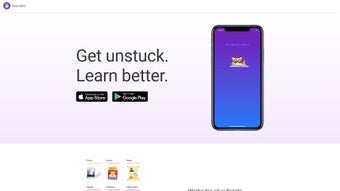

Download Socratic – Free AI‑Powered Study Helper for iOS & Android
Overview
Socratic, Google’s AI‑driven educational companion, transforms ordinary study sessions into interactive learning experiences. By leveraging Google’s cutting‑edge text‑ and speech‑recognition models, the app can instantly analyse a photographed problem, a spoken question, or a typed query and return the most relevant explanations, step‑by‑step walkthroughs, and short video lessons. Whether you’re grappling with quadratic equations, decoding the fundamentals of cell biology, or polishing a literature essay, Socratic aggregates content from textbooks, reputable educational websites, and open‑source platforms, delivering a balanced perspective rather than a single‑line answer.
The interface is intentionally clean and student‑friendly: large icons, intuitive navigation, and minimal onboarding let learners focus on the material instead of fiddling with settings. Because Socratic is tightly integrated with Google’s search ecosystem, its knowledge base is continuously refreshed to stay aligned with current curricula and exam standards across multiple regions. Teachers value the app for encouraging independent research, while students appreciate the blend of rapid answers and deeper conceptual insight.
The tool is free to download from both the Apple App Store and Google Play Store, and it includes a dedicated support hub for technical help, privacy queries, and feature suggestions. Although an active internet connection is required for real‑time AI processing and some users may have concerns about data privacy, the app’s secure cloud architecture, multilingual support, and regular content updates make it a compelling addition to any modern learner’s digital toolkit.
Key Features & Benefits That Set Socratic Apart
- AI‑Powered Text & Speech Recognition: Snap a photo, speak a question, or type it directly; Socratic instantly identifies the subject and extracts the core query.
- Subject‑Specific Resource Libraries: Curated collections for Math, Science, History, English, and more, each packed with articles, step‑by‑step guides, and video lessons.
- Visual Explainers & Interactive Diagrams: Complex ideas are broken down with annotated graphics, flowcharts, and interactive widgets that reinforce understanding.
- Educational Video Integration: Short, high‑quality videos from reputable creators appear alongside text resources for a multimodal learning experience.
- Multiple Source Aggregation: Socratic pulls information from textbooks, trusted websites, and open‑source platforms, ensuring diverse viewpoints.
- Math Solver & Equation Breakdown: For algebra, geometry, calculus, and statistics, the app not only provides the final answer but also walks users through each solving step.
- Cross‑Platform Availability: Optimised for iOS and Android, with seamless syncing via a Google account.
- Secure Cloud Processing: All AI computations happen in Google’s encrypted cloud environment, protecting user data during transmission.
- Regular Updates & Curriculum Alignment: Frequent content refreshes keep the app aligned with current school standards and exam formats.
- Multilingual Support: Built‑in language detection delivers translated explanations and localized resources for non‑English speakers.
Together, these features turn Socratic from a simple answer‑finder into a comprehensive study companion. The AI engine learns from each interaction, gradually improving accuracy and relevance. Because the core functionality is free, schools and families can adopt the app without worrying about licensing fees, democratizing access to high‑quality supplemental instruction.
The visual explainers cater to visual learners, while the video integration supports auditory learners, making Socratic a versatile tool that adapts to a variety of learning styles. Regular updates ensure that the content stays current with evolving curricula, and multilingual capabilities break down language barriers, opening doors for international students. In short, Socratic’s blend of advanced AI, rich multimedia resources, and a zero‑cost model delivers a powerful, secure, and user‑friendly learning experience that aligns perfectly with the demands of modern education.
Installation, Usage & Compatibility – Get Started Quickly
Step‑by‑Step Installation
- Open the App Store on iOS or the Google Play Store on Android.
- Search for “Socratic by Google.” Verify the official logo (a white owl on a teal background) to avoid third‑party copies.
- Tap Get (iOS) or Install (Android). The download size is roughly 80 MB, so a stable Wi‑Fi connection is recommended.
- Launch the app and sign in with your Google account. Signing in enables progress syncing, personalised recommendations, and secure cloud processing.
- Grant the requested permissions: camera access for photo‑based queries, microphone access for voice input, and storage access for saving screenshots or bookmarked resources.
First‑Time Use & Navigation
After signing in, a brief tutorial introduces three primary input methods: Camera Capture, Voice Query, and Typed Search. Selecting the camera icon lets you point your device at a textbook problem; the AI extracts the text, recognises key terms, and presents a list of relevant resources. The microphone icon records spoken questions, which are transcribed and processed in real time.
The search bar offers rapid look‑ups for definitions or short factual queries. Once a query is submitted, results appear in three tabs—Explain (textual breakdown), Watch (videos), and Practice (interactive quizzes, when available). Users can bookmark any result, organise them into custom folders, and revisit past queries via the “History” section, which serves as a personalised study log.
Tips for Maximising Efficiency
- Clear Images: Ensure the photographed text is well‑lit and centred; blurry images can lead to misinterpretation.
- Speak Clearly: Slow, distinct articulation improves speech‑recognition accuracy, especially for technical terminology.
- Combine Resources: Pair a video walkthrough with a step‑by‑step text guide to reinforce understanding.
- Organise Bookmarks: Create subject‑specific folders (e.g., “Calculus Review”) to keep study material tidy.
By following these steps, students can convert a challenging homework problem into a guided learning journey in under a minute, making Socratic an indispensable tool for both quick on‑the‑go queries and deep‑dive revision sessions.
Compatibility: Socratic runs natively on iOS 15 or later and Android 8.0 and above. The app adapts gracefully to iPhone, iPad, and a wide range of Android smartphones and tablets, offering responsive layouts that scale to different screen sizes. Although a desktop version is not available, the mobile‑first design offloads AI processing to Google’s secure cloud, allowing even older devices to benefit without heavy on‑device computation.
Pros, Cons, FAQ & Final Verdict – Is Socratic Right for You?
Pros
- Free and Unlimited: No hidden subscription fees; all core features are accessible at no cost.
- AI Accuracy: Google’s language models deliver highly relevant results across dozens of subjects.
- Multimodal Learning: Combines text, visuals, and video to suit varied learning styles.
- Cross‑Device Sync: Bookmarks and history sync instantly when you sign in with the same Google account.
- Regular Content Updates: New resources are added automatically, keeping the app current with curriculum changes.
- Secure Cloud Processing: Data is encrypted in transit and stored under Google’s strict privacy policies.
Cons
- Internet Dependency: Real‑time AI analysis requires an active connection; offline use is limited to previously saved resources.
- Data Privacy Concerns: Images and voice recordings are sent to Google’s servers, which may raise privacy questions for schools and parents.
- No Desktop/Web Version: Users who prefer studying on a laptop must rely on mobile emulation or screen‑mirroring.
- Limited Depth for Niche Topics: While major subjects are well‑covered, highly specialised courses may have fewer curated resources.
- Potential for Over‑reliance: The ease of getting answers can tempt students to skip critical thinking steps if not used responsibly.
Is Socratic completely free or are there hidden costs?
Socratic is 100 % free to download and use. All core features—including AI‑driven search, math solvers, and video explanations—are available without subscription fees. Google may display optional ads, but they do not restrict access to any educational content.
Can I use Socratic offline?
The AI processing and resource retrieval require an internet connection. However, you can save bookmarked pages and videos for later offline viewing, allowing limited use when you’re without Wi‑Fi.
How does Socratic protect my privacy?
All images, voice recordings, and text queries are transmitted over encrypted HTTPS connections to Google’s secure cloud. Google’s privacy policy governs data handling, and the app provides a clear privacy‑center where you can review what information is stored and request deletions.
Which devices are supported?
Socratic supports iOS 15 or later on iPhones, iPads, and iPod touches, as well as Android 8.0 or later on a broad spectrum of smartphones and tablets. The app automatically adjusts its layout to portrait or landscape orientation.
Will the app stay up‑to‑date with future curriculum changes?
Yes. Because Socratic pulls its knowledge from Google’s continuously refreshed search index, new textbook editions, official exam guidelines, and emerging educational sites are incorporated automatically. Users receive regular “update” notifications that improve both content quality and AI performance.
Final Verdict & Call to Action
In summary, Socratic delivers a secure, free, and constantly updated study environment that works across iOS and Android devices. Its AI‑driven engine, extensive multimedia library, and multilingual support address the core needs of today’s learners while keeping parental and institutional privacy concerns transparent. If you’re looking for a reliable, zero‑cost app that can answer quick questions, guide you through complex calculations, and provide visual and video explanations, Socratic is an excellent choice. Download Socratic today, sign in, and start turning tough questions into clear, confident answers—your next study breakthrough is just a tap away.
Socratic stands out for its blend of powerful AI, rich multimedia resources, and a truly free model. The pros—especially the AI accuracy and cross‑device sync—outweigh the cons, which are largely tied to the need for an internet connection and typical privacy considerations for cloud‑based services. Overall, it is a highly recommended tool for secondary‑school students, college undergraduates, and lifelong learners seeking a secure, up‑to‑date study aid.



.png)



